
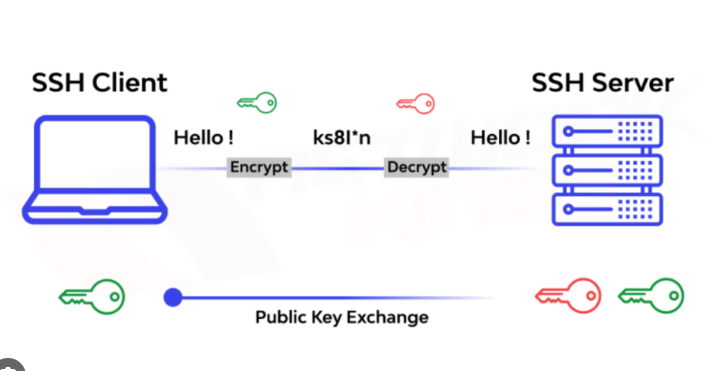
看到群友的机器被入侵了(默哀鸡哥三秒 🕯️)

这里分享一个一键关闭 SSH 密码登录、改为密钥登录的方法。
SSH 密钥用途非常广,不只是登录服务器。比如我们平时 git push 到远程仓库,也常用它做身份认证。
1)本地生成 SSH 密钥(已有可跳过)
推荐 ed25519:
ssh-keygen -t ed25519 -C "ssh-login-key"看到提示后路径直接回车即可,口令可按需设置:
不设口令:方便但泄露风险高
设口令:更安全但首次使用需输入
2)查看公钥
cat ~/.ssh/id_ed25519.pub会得到一整行,例如:
ssh-ed25519 AAAAC3NzaC1lZDI1NTE5AAAAI...... ssh-login-key下面脚本里的“替换成你的公钥”,都要替换成这整行。
3)一键配置(sudo 版本)
强烈建议:执行前先保持当前 SSH 会话不断开,再开新终端验证,避免把自己锁在门外。
sudo bash -c 'set -e

USER_NAME="${SUDO_USER:-$USER}"
USER_HOME="$(getent passwd "$USER_NAME" | cut -d: -f6)"

install -d -m 700 -o "$USER_NAME" -g "$USER_NAME" "$USER_HOME/.ssh"
touch "$USER_HOME/.ssh/authorized_keys"
grep -qxF "替换成你的公钥" "$USER_HOME/.ssh/authorized_keys" || echo "替换成你的公钥" >> "$USER_HOME/.ssh/authorized_keys"

chown "$USER_NAME:$USER_NAME" "$USER_HOME/.ssh/authorized_keys"
chmod 600 "$USER_HOME/.ssh/authorized_keys"

mkdir -p /root/.ssh
chmod 700 /root/.ssh
touch /root/.ssh/authorized_keys
grep -qxF "替换成你的公钥" /root/.ssh/authorized_keys || echo "替换成你的公钥" >> /root/.ssh/authorized_keys
chown root:root /root/.ssh/authorized_keys
chmod 600 /root/.ssh/authorized_keys

mkdir -p /etc/ssh/sshd_config.d

cat > /etc/ssh/sshd_config.d/99-key-only.conf <<'\''EOF'\''
PubkeyAuthentication yes
AuthorizedKeysFile .ssh/authorized_keys
PasswordAuthentication no
KbdInteractiveAuthentication no
ChallengeResponseAuthentication no
PermitRootLogin prohibit-password
UsePAM yes
EOF

sshd -t
systemctl reload ssh || systemctl restart ssh

echo
echo "[OK] 普通用户与 root 已写入公钥"
echo "[OK] 已关闭所有密码登录"
echo "[OK] root 允许密钥登录,禁止密码登录"
echo "[OK] 现在测试:"
echo "ssh root@服务器IP"
echo "ssh ${USER_NAME}@服务器IP"
'
4)无 sudo 版本(仅 root)
bash -c 'set -e

install -d -m 700 /root/.ssh
touch /root/.ssh/authorized_keys
grep -qxF "替换成你的公钥" /root/.ssh/authorized_keys || echo "替换成你的公钥" >> /root/.ssh/authorized_keys
chown root:root /root/.ssh/authorized_keys
chmod 600 /root/.ssh/authorized_keys

mkdir -p /etc/ssh/sshd_config.d

cat > /etc/ssh/sshd_config.d/99-key-only.conf <<'\''EOF'\''
PubkeyAuthentication yes
AuthorizedKeysFile .ssh/authorized_keys
PasswordAuthentication no
KbdInteractiveAuthentication no
ChallengeResponseAuthentication no
PermitRootLogin prohibit-password
UsePAM yes
EOF

sshd -t
systemctl reload ssh || systemctl restart ssh

echo
echo "[OK] root 公钥已写入"
echo "[OK] 已关闭所有密码登录"
echo "[OK] root 仅允许密钥登录"
echo "[OK] 请新开终端测试:"
echo "ssh root@服务器IP"
'
5)验证是否生效
新开一个终端,先测密钥登录:
ssh root@服务器IP
再故意测试密码登录(应失败):
ssh -o PreferredAuthentications=password -o PubkeyAuthentication=no root@服务器IP
如果密码方式失败,说明配置成功。