
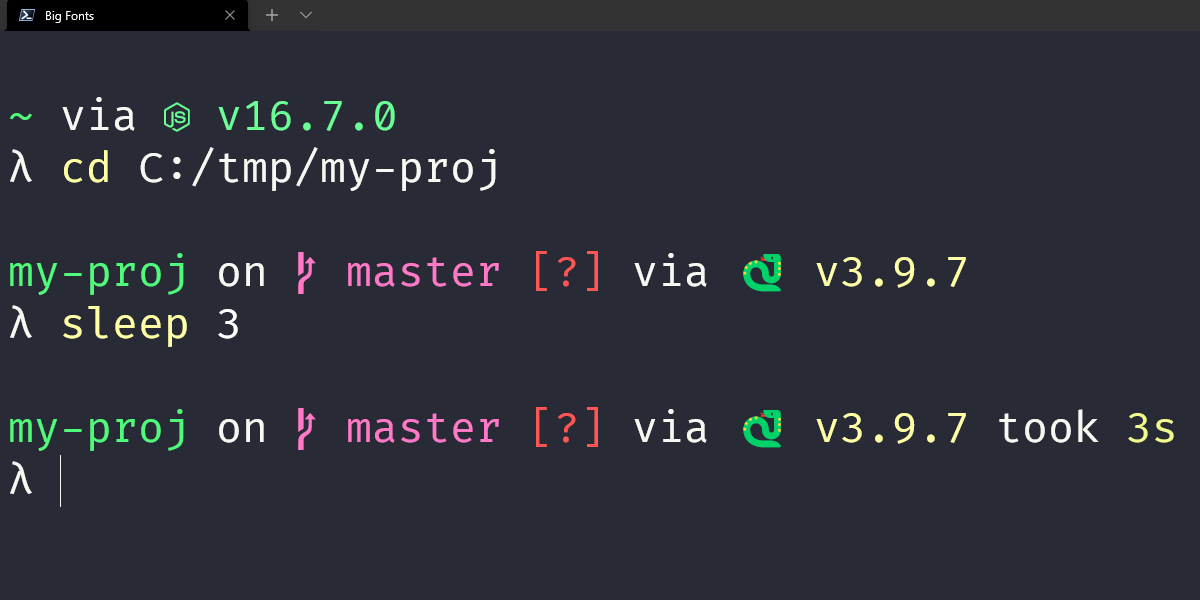
Windows PowerShell 配置:Zoxide + PSReadLine(Prompt 可选 Starship / Oh My Posh)
目标
在 Windows PowerShell 下完成这套迁移:
zoxide提供z跳目录
PSReadLine提供 autosuggestions 和 syntax highlighting
Prompt 二选一:
starship或oh-my-posh
核心是 zoxide + PSReadLine,Prompt 只是外观方案。
安装依赖
winget install -e --id Microsoft.PowerShell

winget install -e --id ajeetdsouza.zoxide

winget install -e --id Microsoft.WindowsTerminal

Install-Module PSReadLine -Scope CurrentUser -Force -SkipPublisherCheck
Prompt 方案按下面二选一再装对应工具。
方案一:使用 Starship
安装:
winget install -e --id Starship.Starship
在 $PROFILE 中加入:
Invoke-Expression (&starship init powershell)
然后继续接后文的 Zoxide + PSReadLine 通用配置。
方案二:使用 Oh My Posh
安装:
winget install -e --id JanDeDobbeleer.OhMyPosh
在 $PROFILE 中加入(默认 spaceship):
oh-my-posh init pwsh --config spaceship | Invoke-Expression
然后继续接后文的 Zoxide + PSReadLine 通用配置。
如果想换主题,只改 --config 的值。
通用:Zoxide + PSReadLine 配置
打开 profile:
notepad $PROFILE
如果不存在先创建:
New-Item -ItemType File -Path $PROFILE -Force

notepad $PROFILE
将 Zoxide + PSReadLine 配置加入 $PROFILE(Prompt 初始化行按你选择的方案放在最上面):
Invoke-Expression (& { (zoxide init powershell | Out-String) })


Import-Module PSReadLine


Set-PSReadLineOption -PredictionSource History

Set-PSReadLineOption -PredictionViewStyle InlineView


Set-PSReadLineOption -Colors @{

Command = 'Cyan'

Parameter = 'Green'

Operator = 'DarkGray'

Variable = 'Yellow'

String = 'Magenta'

Number = 'Blue'

Type = 'DarkCyan'

Comment = 'DarkGreen'

InlinePrediction = 'DarkGray'

Error = 'Red'

}
保存后重载:
. $PROFILE
字体与方框问题
如果提示符里的分支图标、符号、Powerline 图标显示成方框,通常是终端字体不支持 Nerd Font glyph。
按下面最短步骤处理:
安装 Nerd Font
winget search nerd font
常见可用字体示例(任选其一):
CaskaydiaCove Nerd Font
JetBrainsMono Nerd Font
在 Windows Terminal 修改字体
打开 Windows Terminal → Settings
找到你在用的 PowerShell Profile
Appearance→Font face
改成你安装的 Nerd Font(例如
CaskaydiaCove Nerd Font或JetBrainsMono Nerd Font)
重启终端
验证
检查版本:
$PSVersionTable.PSVersion

Get-Module PSReadLine -ListAvailable | Sort-Object Version -Descending | Select-Object -First 1 Name,Version

zoxide --version

starship --version

oh-my-posh --version
检查预测是否启用:
Get-PSReadLineOption | Select-Object PredictionSource,PredictionViewStyle
预期:
PredictionSource : History

PredictionViewStyle: InlineView
试用:
z code

z blog

z docs
最终完整配置
A. Starship 完整版
Invoke-Expression (&starship init powershell)

Invoke-Expression (& { (zoxide init powershell | Out-String) })


Import-Module PSReadLine


Set-PSReadLineOption -PredictionSource History

Set-PSReadLineOption -PredictionViewStyle InlineView


Set-PSReadLineOption -Colors @{

Command = 'Cyan'

Parameter = 'Green'

Operator = 'DarkGray'

Variable = 'Yellow'

String = 'Magenta'

Number = 'Blue'

Type = 'DarkCyan'

Comment = 'DarkGreen'

InlinePrediction = 'DarkGray'

Error = 'Red'

}
B. Oh My Posh 完整版(默认 spaceship)
oh-my-posh init pwsh --config spaceship | Invoke-Expression

Invoke-Expression (& { (zoxide init powershell | Out-String) })


Import-Module PSReadLine


Set-PSReadLineOption -PredictionSource History

Set-PSReadLineOption -PredictionViewStyle InlineView


Set-PSReadLineOption -Colors @{

Command = 'Cyan'

Parameter = 'Green'

Operator = 'DarkGray'

Variable = 'Yellow'

String = 'Magenta'

Number = 'Blue'

Type = 'DarkCyan'

Comment = 'DarkGreen'

InlinePrediction = 'DarkGray'

Error = 'Red'

}
C. 方框字符排查(最短步骤)
安装 Nerd Font
在 Windows Terminal 中切换 Font face
重启终端